

WhatsApp is introducing a new feature to iOS and Android that enables users to create custom contact lists and specify which lists can see specific status updates. This update replaces the current method of manually adjusting “Share only with” privacy settings every time a status is posted.
This change was first reported by WABetaInfo. Meta has not provided any official announcement regarding regional availability or a timeline for when the feature will be rolled out to all WhatsApp users.
How WhatsApp status lists work
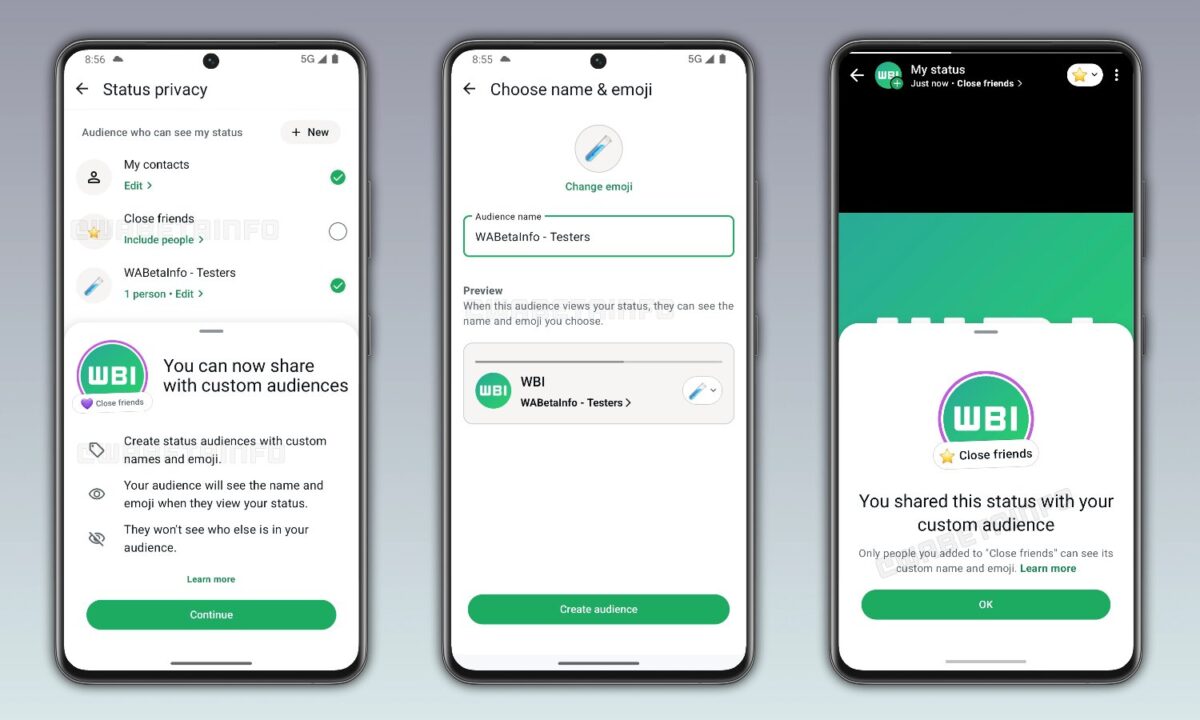
A list is a custom group of contacts created manually by the user. When posting a status update, the user can choose which list he or she should see, allowing different audiences to receive different content. For example, family members may see one type of update, while coworkers may see another type of update.
WhatsApp automatically creates a default list called Close Friends. Users can add their most personal contacts to this list for quick sharing of private updates without having to select individuals every time. The list can be edited at any time by adding or removing contacts.
WhatsApp does not notify others when a list is changed. Updates to list subscriptions are kept private, similar to how the blocking and muting functions work on the platform.
What changes will happen for users and when will status lists be available
This feature makes it easy to choose a status audience by providing quick shortcuts. Users no longer need to go into privacy settings before each post to adjust who can see it. Instead, they can select a pre-made list directly from the status sharing interface.
For those who typically post the same status to all contacts but occasionally want a more private audience, this offers a faster way to manage that workflow. For users already using the manual “Share only with” control, the update replaces the multi-step process with a single selection.
This feature is gradually being rolled out on both iOS and Android devices. The meta has not yet specified which regions will see it first or when it will be more widely available. As soon as the rollout reaches their account, users should check the status sharing interface for the new option.